Pages, proof text, spacing and kerning.
Shift 0.2.0 is the second alpha. A document now holds pages of proof text shaped by your own font, and two new tools, Spacing and Kerning, let you adjust a font's rhythm directly in that text.
This is still early software. Work on copies of your fonts and keep independent backups. Documents saved in 0.2.0 use a newer format and no longer open in 0.1.1.
Pages and tabs
A document now holds pages, and the canvas shows one at a time. Add, rename, and reorder pages from the pages list in the sidebar. The glyph overview is a pinned tab; each glyph and page you open gets a tab of its own, and the window reopens with the tabs you left.
Undo and redo switch to the page they change, so you always see what came back. Each page keeps its own pan and zoom, and switching pages or tabs never marks the document unsaved.
Proof text, shaped by your font
The glyph you open sits inside a line of text. Choose the Text tool (T) and type around it: the text reflows as you go, and the glyph you are editing stays editable in place. Back in Select, double-click any glyph in the line to edit it, or double-click a component to open its base glyph beside the one you are editing. Press Escape to step out one level at a time; at that level, glyphs in the line can be moved, scaled, rotated, and flipped as whole glyphs.
Proof text is shaped with your font's own feature code and pair kerning, so what you type is set as the font will be. Arabic and other right-to-left scripts work, including lines that mix directions: arrow keys move on screen, and clicks land on ligature carets where the font puts them.
The Text section of the sidebar sets each run's size, line height, alignment, language, and script. Turn off Shaping to see the text one glyph per character.
Switch features on and off
The Features section lists every feature the proof text can switch, grouped as Ligatures, Letter case, Figures, and so on. Click a feature's dot to turn it on or off for the run, or back to the font's default. Hover a tag to highlight the glyphs it changes in the text, and click it to open a preview of every substitution it makes, from which glyphs can be copied or inserted into the text.
Space glyphs with the Spacing tool
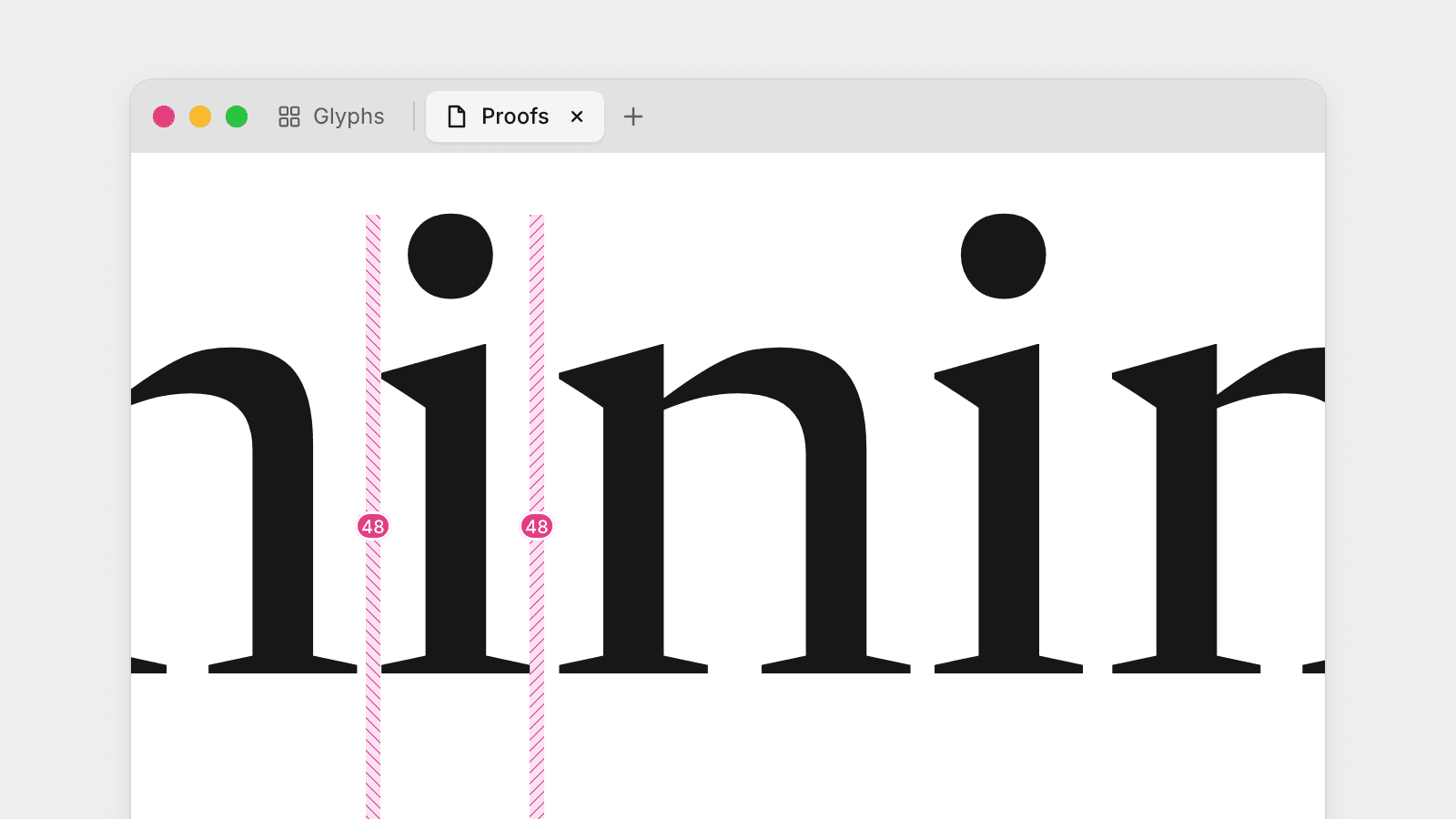
The Spacing tool (S) shows each gap between glyphs as two halves: the left glyph's right sidebearing and the right glyph's left sidebearing. Hover a half to see its value, then drag to change it. Every copy of that glyph updates live, and the drag snaps to the other half of the gap or to the glyph's opposite sidebearing.
Click a value to type an exact number. ↑ and ↓ step it (Shift for 10), Tab moves to the other side, and Escape cancels. Click a half to select it, then nudge it with the arrow keys (Shift ×10, Cmd ×100) and walk along the line with Tab and Shift+Tab.
In kerned text, each sidebearing is still measured against its own glyph's advance, so spacing never disturbs the kern.
Kern pairs and groups
The Kerning tool (K) shares a toolbar slot with Spacing. It draws each kern as a strip between the two glyphs with its value below the baseline. Drag the strip or nudge with the arrow keys to change it; hovering a value highlights every pair in the line that the edit will reach.
Select a pair and the Kerning section in the sidebar shows each side's group, an exception lock for each side, and the kern value. In a variable font, a Masters list shows the pair's value at each master and lets you remove it from one.
Open the kerning groups panel from the Kerning section to create, rename, and delete groups, and to add or remove members. Its preview sets every member of a group against the other side of the current pair, so you can check a whole group at once.
Kerning is kept for each master through UFO, Designspace, and Glyphs import, save, and export.
Anchors and marks
Accented glyphs now inherit anchors from their components, as Glyphs and fontc compile them: an accented letter takes its base's anchors and its accent's, so further marks stack on top. Inherited anchors are drawn dimmed in the editor.
Choose Glyph → Add Anchor (also in the canvas context menu) to add an anchor at the pointer and name it in the sidebar. Components placed on matching anchors stay attached: move a base anchor and every composite built on it follows, in one undo step. Align to Anchors in the context menu reattaches components you moved by hand.
Shift now records each glyph's category and compiles it into GDEF, so glyphs like jdotless are no longer treated as marks, and combining marks export at zero width.
Snap to metrics and points
Points you drag with Select or place with the Pen now snap to the baseline, x-height, cap height, ascender, and descender, and line up with other on-curve points on screen. Guides show what a point has snapped to, and points resting exactly on a metric line get a soft halo. Hold Cmd (Ctrl on Windows and Linux) to suspend snapping, or Alt to turn it off for the whole drag.
A toolbar that floats
The tools have moved out of the title bar into a floating bar over the canvas. Drag its grip to dock it to the top, bottom, left, or right edge of the canvas, or double-click the grip to flip it to the opposite edge. It turns to fit the edge and follows the canvas as sidebars open and close.
Themes
Shift now ships 34 community themes, converted from Tinted Theming's base16 schemes: Catppuccin, Rosé Pine, Tokyo Night, Flexoki, Kanagawa, Everforest, and more. In Settings → Appearance, pick one theme for light mode and one for dark, and let Shift follow the system.
Your choice is saved in a plain config.toml in Shift's config folder, so it can live in your dotfiles:
theme = { mode = "system", light = "catppuccin-latte", dark = "kanagawa" }
Edits to the file apply to every open window without a restart. Drop a base16 palette into themes/<name>.toml to add your own theme, and use its [colors] table to override any interface or canvas color, from the accent to the selection fill.
A new launcher, and updates in the window
The launcher has a new layout: your most recent font gets a wide tile with its family name set in the font itself, and the rest sit in a grid or list beside Open… and New font.
Updates are now offered in a small strip at the bottom of the launcher and editor windows, instead of a separate window. Download, watch it fill, and restart when you are ready.
Shift and agents
Every Shift build bundles shift-cli. Choose Shift → Install Command Line Tool… (Help → Install Command Line Tool… on Windows and Linux) to put it on your PATH, and optionally install the Shift agent skill for Claude Code, Codex, and other agents. New commands include:
shift-cli checkreports interpolation, axis, drawing, and kerning problems in any source Shift opens, with--jsonoutput.shift-cli font create --fromstarts a document with another font's axes, masters, and metrics, andshift-cli glyph exportcopies glyphs, components included, from any font into it.shift-clican read and edit kerning, and render proofs of a font without opening the app.
In Settings → Agents, turn on Allow agent connections to let local agents work with the fonts open in Shift over MCP. It is off by default. Agents can read the font and render it, write proof text, add and rename pages, undo and redo, and change the tool, page, and view. They cannot change glyphs, kerning, or files directly.
Smaller improvements
- Editing large glyphs and large fonts is faster: drags, undo, and opening fonts do less work per edit.
- The Objects sidebar shows each closed contour's direction and marks its first point. Click the direction icon to reverse the contour.
- The Add Component picker can be browsed with the arrow keys.
- Unsaved changes are shown with a dot (in the close button on macOS) instead of "Edited".
- After a crash, forced quit, or update restart, open documents reopen on the glyph they last showed.
- On Windows and Linux, Open Font… now lets you pick font files, and Open Font Folder… opens UFO and Glyphs packages.
- Imported fonts whose features use
include()files now compile, sources with several families or repeated instances open, and variable fonts with mapped axes or scaled components interpolate correctly.
Platforms
- Windows and Linux now have native arm64 builds, and arm64 packages are published to the APT and DNF repositories.
- On Windows and Linux, Shift draws its own title bar with the menus built in.
- Linux AppImages in a writable folder now update themselves, as macOS builds do, and Linux uses the GPU for drawing.
- Shift now runs on Ubuntu 18.04 and RHEL 8 and later. macOS 13 or later is required; Windows 10 or later as before.
Known limitations
- Documents opened and saved in 0.2.0 are upgraded to a newer format and cannot be opened in 0.1.1.
- TTF and OTF files remain view-only.
- Windows release builds are unsigned, may display an operating-system warning, and do not update automatically.
Please continue working on copies and keep your original sources and independent backups.
Share feedback
The Help menu includes Report a Problem, Show Logs, and Feedback. You can also email me directly. Try spacing and kerning a word or two, and tell me what you would reach for next.
[!WARNING] Alpha: Work on copies and keep independent backups. The macOS builds are signed and notarized. Windows builds are currently unsigned and may trigger Microsoft SmartScreen. Linux RPMs and the checksum manifest are signed with the Shift repository key. See the code signing policy.
0.2.0 (2026-11-10)
💥 Breaking changes
- editor: type toolIf by the tool's class (#822)
- editor: answer the agent readers' questions on the model, not in the readers (#817)
- runtime: select sources and layers by name in agent reads (#815)
Features
- agents: bundle shift-cli and install it from the app menu (#550) (5f88819)
- backends: compile authored features into a shaper font (#589) (fa14dba)
- bridge: expose a read-only layer reader (9cbf971)
- bridge: shape text runs with the live shaper font (#596) (ea20421)
- cli: check fonts for interpolation, axis, and drawing problems (#642) (dd3c744)
- cli: create a document from another font's structure (#633) (16d5ab1)
- cli: expand atomic font authoring (#507) (ef19915)
- cli: export glyphs from any font as glyph batches with components (#629) (f92784a)
- cli: install the Shift agent skill with shift-cli (#569) (981ac96)
- cli: read and edit kerning with shift-cli (#580) (e38be44)
- cli: render proofs of fonts without opening the app (83938dc)
- cli: render proofs of fonts without opening the app (a2884ed)
- colour the launcher ghost lid with the theme accent (#506) (8a1616a)
- desktop: add pages, document and window tabs, and sidebar sections (#856) (4bc49b6)
- desktop: add your own themes as files in the config folder (#605) (059576e)
- desktop: bundle 34 community base16 themes (#634) (726ad23)
- desktop: choose the theme in a live-reloaded config.toml (#604) (40ef861)
- desktop: let a window read its workspace's layers synchronously (0640d9e)
- desktop: mark unsaved changes with a dot instead of "Edited" (#614) (83aa6cf)
- desktop: offer updates in a strip inside the app (#890) (fafa86d)
- desktop: override any interface or canvas color in a theme file (#606) (86a1958)
- desktop: reopen documents on their last glyph after interruptions (#495) (1942499)
- document: keep the canvas in the engine and save it as edited (#865) (39479dc)
- draw Shift's own title bar on Windows and Linux (#557) (062d751)
- editor: add a Kerning tool for proof text (#553) (5ca476f)
- editor: add a Spacing tool for adjusting sidebearings in proof text (#528) (6021608)
- editor: browse Add Component results with the arrow keys (#571) (e223ea7)
- editor: create and edit kerning groups (#561) (a032d30)
- editor: dock the floating toolbar by zone (5a219c5)
- editor: edit layers through the window's engine (54afac2)
- editor: flip the floating toolbar across the canvas on double-click (451a048)
- editor: float the tools over the canvas and dock them to any edge (#612) (c44550c)
- editor: let node definitions respond to double-clicks and content changes (#508) (3ec02e8)
- editor: pivot the floating toolbar about its handle (0669b86)
- editor: pivot the floating toolbar about its handle (e80bbe7)
- editor: propagate and attach anchors as export compiles them (#654) (c0bba2f)
- editor: show contour direction and first point in the object tree (#485) (d641450)
- editor: show the edit's page on undo and keep each page's camera (#870) (ab83165)
- editor: snap points to metrics and other points (#513) (e7dacfa)
- editor: space each glyph against its own advance (#594) (fd124ac)
- editor: transform whole glyphs in a text run (#519) (e73e740)
- engine: add an editing session over a partly loaded font (c6c2664)
- engine: build the editing engine as a WebAssembly module (efa1d9e)
- engine: edit layers through the engine in the renderer (cfdd62b)
- engine: persist the engine's edits and undo them in the window (3ec2a9c)
- engine: preview and preload edits in the window's engine (4f0b3c0)
- expose live Shift font and editor reads to agents (#489) (fa46fd7)
- keep each master's kerning through import, save, and export (#548) (af3caff)
- launcher: restyle the launcher as a header and bento grid (#875) (7b1dbdd)
- layout: lay out scene pages with Taffy, text measured by shift-text (#897) (bc03d8e)
- mcp: let agents control what a Shift window shows (#873) (1735853)
- mcp: let agents edit pages and undo (#894) (aa4007e)
- mcp: let agents set a text run's options (#888) (f6a8033)
- mcp: let agents write proof text on the canvas (#869) (5b49dfd)
- mcp: read kerning groups, pairs, and values over MCP (#581) (e23ade2)
- publish arm64 packages to the Linux APT and DNF repositories (#603) (8a9142d)
- publish native arm64 builds for Windows and Linux (#595) (94a90ac)
- runtime: select sources and layers by name in agent reads (#815) (47b40a6)
- scan: report conditional spreads and nested inline functions (656ea7c)
- scan: report Rust structure worth a reviewer's look (28c6f0e)
- scan: report TypeScript that ports a Rust rule or misses a method (9d6f96f)
- scan: scan tests and report test ledgers and refactor churn (57c62af)
- shape: position generated features at their insert markers (#859) (3c18331)
- store glyph categories and compile them into GDEF (#588) (4077a4e)
- store: read a font's directory through the read-only reader (d900fc7)
- store: read a store read-only beside the process that writes it (60991db)
- text: add editable text runs as scene nodes (#459) (1b51cc3)
- text: add the Features section and feature preview (#864) (f20c7d3)
- text: edit shaped and mixed-direction proof text (#862) (7b7b179)
- text: kern proof text with the font's pair kerning (#549) (484e663)
- text: lay out proof text in Rust (#861) (589b312)
- text: set proof text's features, language, script and lines (#863) (23fb0a3)
- text: shape proof text with the font's feature code (#618) (7ef9982)
- update Linux AppImages from their release channel (#544) (81791fd)
Bug Fixes
- agree with Rust on lone closed points and collapsed scales (#664) (2068c5f)
- backends: report Designspace instances that share a location (#716) (25bce22)
- bridge: initialize the engine before the bridge tests read through it (#887) (215be64)
- ci: open screenshot fixtures through the native workspace interface (#854) (1719655)
- cli: print numbers with one precision in every report (#727) (db04685)
- deps: update tokio to 1.54.1 for RUSTSEC-2026-0386 (39e582a)
- desktop: keep canvas shortcuts working after sidebar focus (#651) (dc48fe8)
- desktop: keep New and Open commands enabled without active windows (#491) (b001475)
- desktop: keep sidebar widths stable across views and resizes (#500) (aa3ea65)
- desktop: keep the Text tool available when previewing fonts (#529) (3cea05e)
- desktop: release the window's store reader before deleting it (27e9bed)
- desktop: show the Transform sections below Kerning, before Text and Features (#889) (7937e22)
- document: open a glyph page without marking the document unsaved (#882) (bf83062)
- editor: frame a fit requested before the canvas is laid out (#672) (dfa29be)
- editor: keep anchors and components with the outline on LSB edits (#531) (6ade7f2)
- editor: keep the toolbar grip at its muted colour (29e8fb2)
- editor: keep the toolbar's tools visible while it is carried (4726afc)
- editor: let the toolbar's tip lead toward the sides it faces (e3a40f5)
- editor: paste many contours in one engine call (86bd824)
- editor: snap and hit-test edited glyphs at their size in scaled text (51d4649)
- editor: snap and hit-test edited glyphs at their size in scaled text (a3e3191)
- editor: steer the floating toolbar by regions, not zones (89e84e8)
- editor: steer the floating toolbar by regions, not zones (e86f540)
- editor: stop pen and shape editing at interpolated locations (#577) (b011282)
- editor: treat glyphs as marks only when export does (#660) (8286661)
- font: decompose components on every master (2619a14)
- font: serialize fonts stably and compute trig with libm (#704) (88ae480)
- font: store negative zero coordinates as zero (6c8518c)
- import: inline feature include files so imported fonts compile (#554) (443dc28)
- import: keep variable fonts whose axis default is its minimum valid (#598) (ffaf37b)
- import: open multi-family and repeated-instance sources (#641) (39c7092)
- install the ALSA library with the Linux DEB (#600) (0ad3647)
- interpolation: restore interpolation for mapped weight axes (#539) (0916dad)
- linux: keep npm output out of the cross-toolchain path (#635) (da14d2c)
- make desktop chrome and canvas overlays follow the theme (#469) (8dfe36f)
- open font files on Windows and Linux (#547) (3bd06c6)
- pen threshold on screen, channel error codes and three smaller bugs (#730) (e694c4d)
- preview: shape proof text in UFO, Glyphs and designspace previews (#900) (351c94c)
- scan: make shift-scan's Rust reports point at real problems (c2927d1)
- sdk: build and run the packed SDK in Vite and Next consumers (#883) (1ee337a)
- store: read each reader request from one committed state (3835882)
- store: update zstd to 0.14.3 for RUSTSEC-2026-0391, -0398, -0403 and -0410 (d384f5d)
- store: verify a clean claim before discarding unsaved edits (3c32807)
- support Ubuntu 18.04 and RHEL 8, and require macOS 13 (#617) (7aef927)
- text: lay out zero-width glyphs and marks at their real advance (#896) (1f7d317)
- text: type on the page you switch to in text mode (#912) (f2e113a)
- themes: keep the theme module free of runtime package imports (b125129)
- tools: apply a queued pointer move before a key's modifiers (#858) (de515d3)
- ui: show tooltips above the floating toolbar layer (#623) (dcd7ab1)
- use the GPU for WebGPU on Linux (#560) (d9e7a33)
- variation: interpolate scaled components the way fonts compile them (#647) (9c9b697)
- variation: stop mapped axes collapsing masters onto the default (#640) (b0cb2dd)
Performance
- desktop: open the window's engine from the workspace's directory (36bf446)
- desktop: profile a drag on a pasted glyph of any size (52279e7)
- desktop: profile a point drag and the renderer's memory (f7839de)
- editor: draw and hit-test long text runs per glyph, not per letter (#668) (f7df964)
- editor: draw each snap line once and cross only the corners on it (3637548)
- editor: index store records and rebuild the scene only on node changes (#517) (8bcbf5c)
- editor: keep text layout still while a drag moves only points (df8325f)
- editor: look up alignment snap targets by axis instead of scanning them (bb48e22)
- editor: move points faster and restore the nightly perf suite (#670) (0cb74d2)
- editor: preload a glyph's read set when the window shows it (4647819)
- editor: read a point selection's bounds from the contour buffers (39702c1)
- editor: segment each moved contour once per frame (5c31b07)
- editor: send big glyph edits without their unchanged parts (7a7f870)
- editor: stop selection and pointer events re-rendering the editor (#505) (9c96150)
- engine: send moves to and from the engine as numbers (ae1e542)
- font: back the font's lookup maps with a B-tree (c0026d9)
- font: index large change sets by difference (8b9925f)
- font: intern font-level ids (86d189f)
- font: make one edit cost what the edited layer costs (602f0ad)
- font: make one edit cost what the edited layer costs (f89d559)
- font: share kerning between font copies (898d386)
- font: share the glyph list between font copies (dc9be0f)
- rebuild only edited contours in the Objects panel tree (#568) (85706ac)
- speed up scrubbing, undo, and font opening on Linux (#565) (417a0cb)
- stop the closed Add Component picker re-ranking glyphs (#562) (e362c45)
- store: create a document's schema in one transaction (#678) (13f09e4)
- store: keep component reference queries prepared (#839) (b5ae7d5)
- store: write only the layers a change set changed (43608a3)
- text: shape proof text synchronously through a shared shaper (#683) (81c0d8b)
- tools: hit-test the pointer only when a tool reads its target (8ba8cc9)
- wasm: load the engine module from its own file (8931355)
- workspace: reply to an edit with only the glyph records it changed (9a3cad2)
- workspace: sweep layer residency only when layers can disappear (b9e37ea)